In control panel, the following support functions are available within each customer details page:
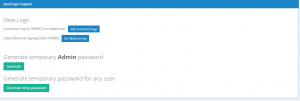
- View connection logs – display the logs of all user login attempts.
- View DBServer Log (available from WebAPI v64) – displays the latest log file of the dbserver. This is handy for investigating exceptions and errors in the customer’s server.
- Generate a temp login password for “Admin” user (available from WebAPI v64) – this allow Sportlogic’s support team to connect to the customer’s database and investigate problems. This login is one-off only and can only be used within 5 mins.
- Generate a temp login password for any valid user – same as above. This helps the support team to debug issues for certain user login. e.g. permission issue.